
Nightwatch: how to get your agents to keep working while you sleep
Vincent Vankrunkelsven – 14 min read

I've been obsessed with code generation since I started programming. Writing the same hundreds of lines of boilerplate code every single day never really appealed to me. AI has enabled us to focus more on thinking in systems and code became a commodity. I've always known I'd be a heavy adopter when the AI revolution hit, and even changed jobs in order to do so.
In the past year, we've been ramping up our development workflows with AI at Conveo. In this article, I want to give you a sneak peek under the hood. This article is about the /nightwatch, a skill that was refined from several nights of trial and error trying to keep agents running and focused on delivering a feature.
Here's an extract from the skill taken directly from our internal repo, and I think it summarizes well what I was going for:
A human (the Captain) plans in the afternoon with a laptop-side agent (the Helm). The Helm shapes the work into tickets and constraints and spins up a persistent remote orchestrator on a big remote box. The remote orchestrator self-plans its build order and self-spawns worker agents overnight. By morning there's a reviewed master PR, an auto-generated test plan, and, the moment the Captain comes online, an in-app reviewer spun up on their laptop.
The afternoon planning
The idea behind nightwatch is simple: help us leverage AI maximally to automate part of the software development cycle. We use it for big chunks of work: a new subsystem, a big migration. It can also be used for refactors. We don't use it for bug fixes or small tickets, as there is some overhead in setting it up. For smaller work, we use a single Claude agent or Devin.
We use it by simply invoking the /nightwatch skill in any agent. It'll ask you for more information about what you want to build and I usually refer it to a Notion doc, a Slack thread… but you can also just enter the context in the prompt to your agent. The moment you invoke the watch, you'll turn into the (human) Captain, and the agent you're addressing on your local machine will call itself the Helm. It will enter the first phase: the planning.
Leaving no stone unturned, it will first initiate building out context by fanning out and investigating the codebase. It is directed to ask you questions until it has enough context to create a first draft of a spec file. Once it knows enough, it will create a spec file, either markdown or HTML:
.md: simple plan file with straightforward requirements.html: more complex features; the file can contain useful schematics built by our plan agent
I've built a small wrapper tool that allows us to host markdown or HTML files, and allow us to send feedback directly to our running agents from within. Here's what it looks like:
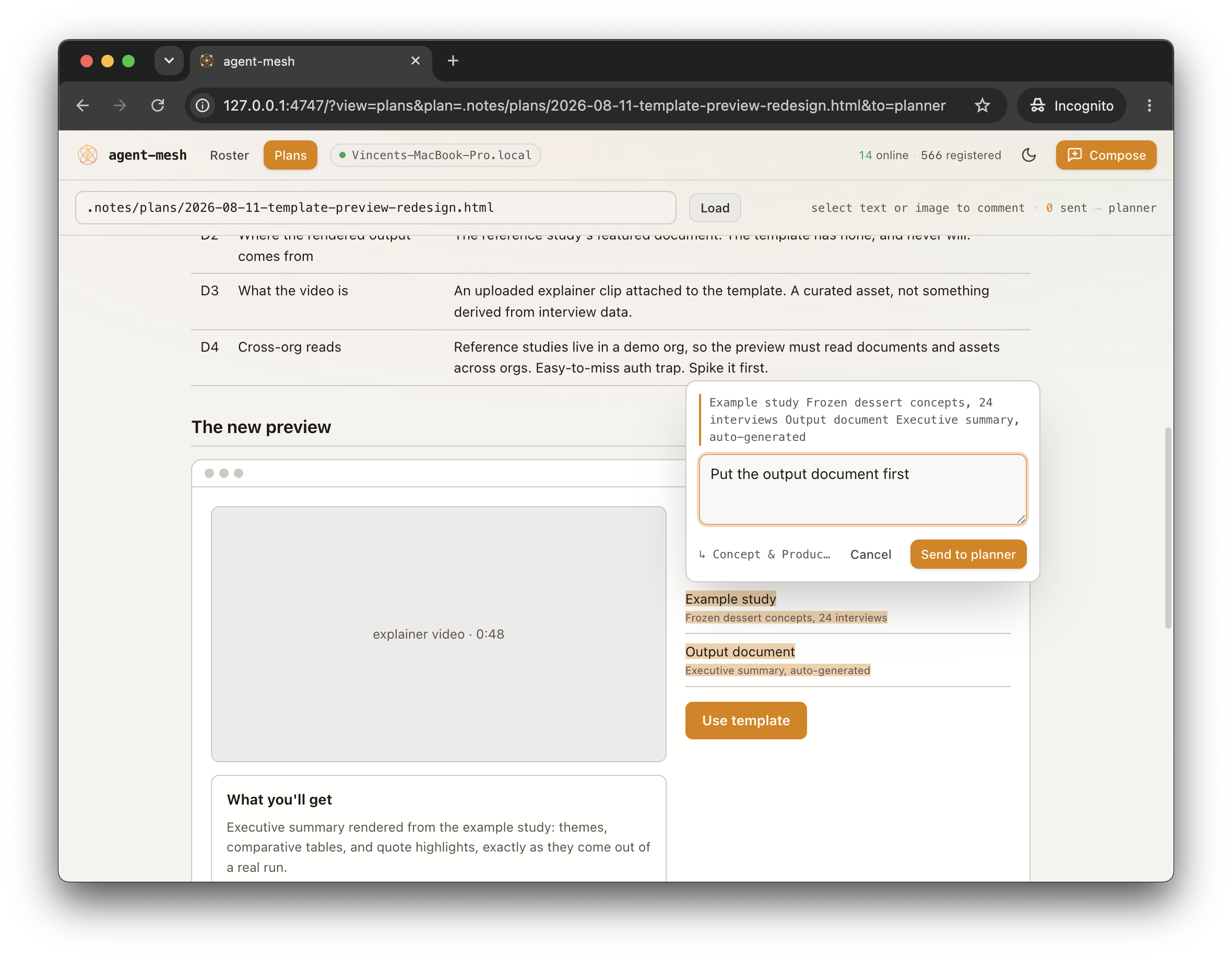
This was from planning a feature around a new template preview page (I'll use this example throughout the article). You might wonder how the comment ends up in the running agent, but we'll come back to that later (it runs through the agent-mesh!).
The output of the planning phase is a bunch of Linear tickets. The skill explicitly mentions thinking about the dependency graph of these tickets, as this helps with the next phase.
The night run
Alright! The plan is ready to go, you have a Linear project with a ton of tickets. What's next? The next part of the skill takes place on the remote instance. All engineers at Conveo have their own always-on EC2 instance, giving their agents a dedicated remote environment where they can work in the background. Mine is called coder-vincent-superset-beast and has become a company meme. More on this later.
The night run begins with the Helm handing over the plan and Linear project to an agent running on the remote instance. I called this agent Field Orchestrator. This orchestrator builds up full context, and is able to start up its own worker instances that all run in their own git worktree, with the ability to start up an isolated version of the app. We use Superset for this tooling, and I'll dive a bit deeper into that later.
As you see, each worker owns their own ticket. They also push to their own GitHub PR where we have several automated review agents running for the non-functional (and functional) validation checks. We have agents that review security, performance, code quality, … you can add your own to the list, but be sure it converges eventually.
At this point, I should tell you that keeping these systems running seems easier than it is. Something always happens, which is why you need your field orchestrator to wake up periodically and check on progress of all of its workers. It takes a bit of tweaking but you'll get there.
The output of this night run phase is simple: 1 PR, the full feature. The smaller worker PRs get driven until all of their validation checks pass, after which the field orchestrator merges all of them into a single master PR which is then also driven to validation checks. For the template preview feature I used as an example earlier, the fleet ran for 7.5 hours on 3 agents and resulted in one neat PR, fully green with screenshots and all, ready to be reviewed by the captain!
The morning review
Great! One PR, 8k lines of code to review, what's next? Ugh…
I strongly believe there are still things that are best left to check with humans. However: I don't think it makes sense for a human to read through 20 files of React Components that build out a fancy React table. You test the parts, the integrations, and you check the UX of the feature as a whole.
The final stage of the /nightwatch focuses on the latter part. The Captain runs through the UX of the new feature and leaves comments. Truth be told: the first version of a feature coming out of the nightwatch almost always looks horrible. We've actually made this the expectation, not the exception. The moment the Captain opens up their laptop in the morning, the Field Orchestrator receives a message and spins up a workspace on the Captain's laptop. You grab an extra coffee, and when you're back at your desk the feature is ready for thorough QA.
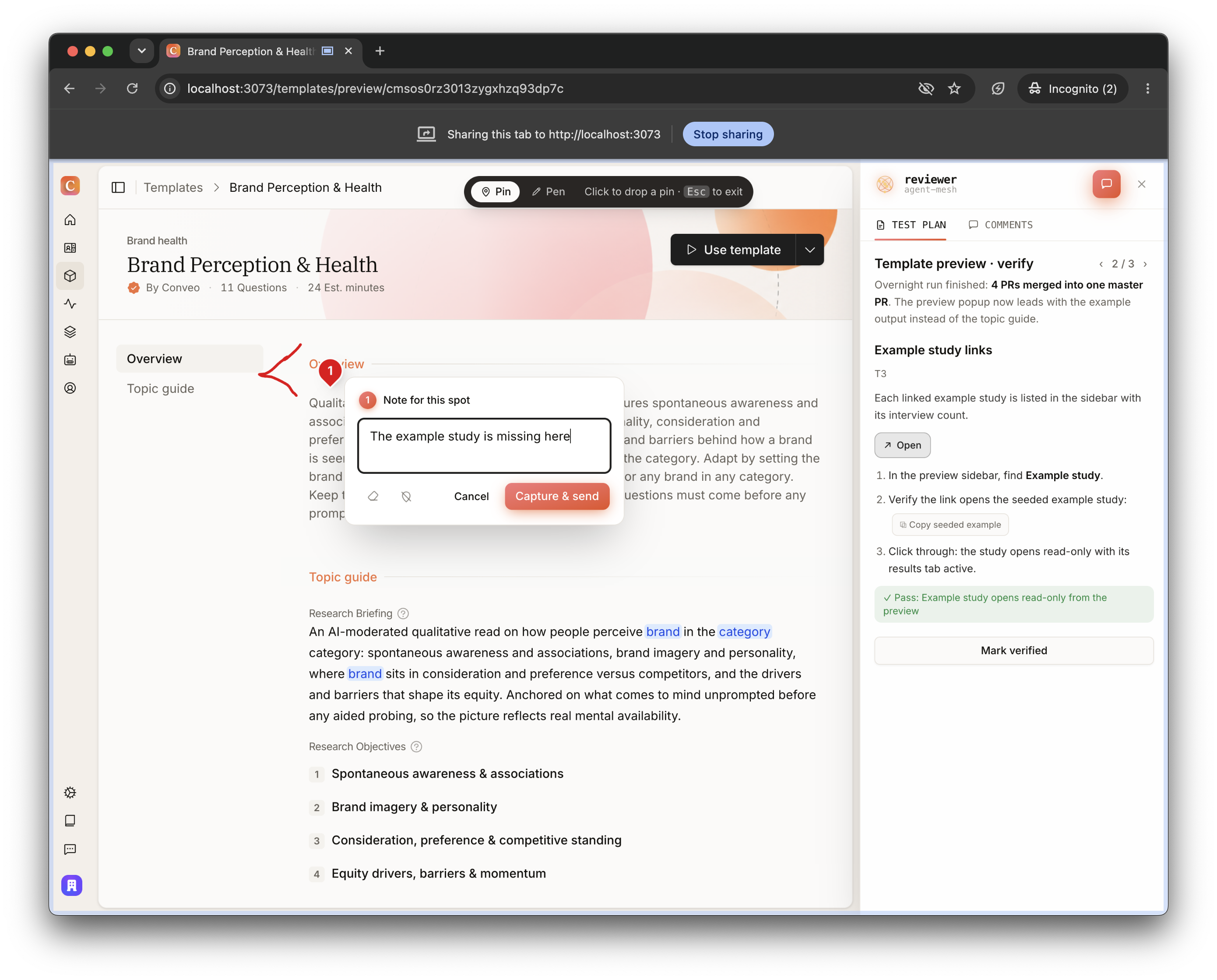
I added a small tool in our app in development mode, that allows you to run through a test plan that the nightwatch has created for your feature. You follow along, run through the app with all of the data pre-seeded for your QA (it takes care of this). At any point, you can create screenshots, draw on the screen and comment on stuff you don't like and the review agent keeps running in the background collecting feedback. This is what it looks like:
Agents starting agents
I promised I'd tell you more about Superset. None of the above works unless agents can start other agents: the Helm spawns the Field Orchestrator when planning wraps up, the field orchestrator spawns workers all night, and in the morning it spawns the review agent on my laptop. No human is around for any of it.
We use Superset for this. A Superset workspace is essentially a git worktree plus a startup script. Inside a workspace you run one or more agents, which are just agentic CLI sessions like Claude Code, Codex, or OpenCode. The part that matters for nightwatch is the Superset MCP: a running agent can create workspaces and spawn new agents itself. Agents starting agents.
The daemon also runs on remote machines. Remember the EC2 instance from the night run? It starts the Superset daemon on boot, so the box shows up as a remote host that any agent can spawn onto. The Helm doesn't ssh anywhere, it just asks Superset for a workspace on the beast. And yes, the beast: when I registered my instance I named it coder-vincent-superset-beast, mostly because it's a big machine. Colleagues started asking whether their run could go on the beast. I've stopped fighting it.
The connective tissue: agent mesh
Time to pay off the other promise. All messages to agents run over the same thing: the plan comments, the handover to the Field Orchestrator, workers reporting progress, the wake-up call in the morning, UX feedback comments. We call it the agent mesh.
The nightwatch is a multi-agent distributed system, and the communication layer is what enables it. Ours is small on purpose: a CLI plus a per-host daemon, on top of Redis Streams.
Streams, not pub/sub. Every agent has a durable inbox with a read cursor. A message to a sleeping agent isn't dropped, it waits. That's what makes closing your laptop safe: nothing gets lost just because nobody was listening at that moment.
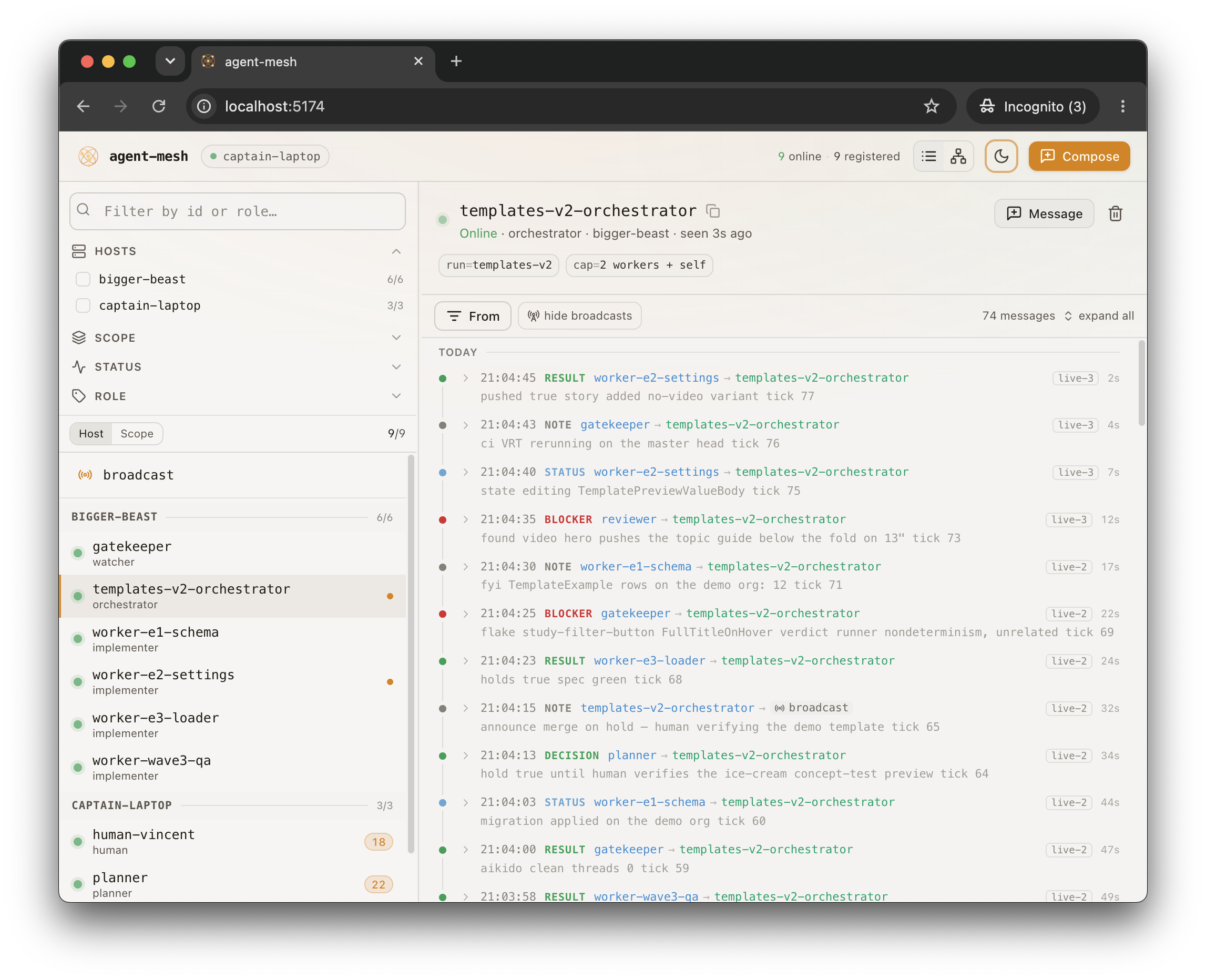
Messages are typed (status, blocker, decision, request, result, note), addressed to an agent id, and threaded by correlation id. We also built some tooling on top of the mesh to make it easier to monitor: the mesh dashboard. It gives us insight into messages that agents sent each other overnight. Here's what it looks like:
Most of us run Claude Code, and reactivity comes from monitors: a monitor tails the mesh watch command, and every message it prints wakes the session up for one turn. Without something like it, your agents only check their mail when they happen to look.
Two more things the Field Orchestrator relies on. Its watch emits a tick every 15 minutes, because an orchestrator that only reacts to events has no clock: a sleepy worker never produces the event that would trigger a timeout. On every tick it checks commits and file activity in the worktrees, not just messages. Before the night starts, the Helm sends the Field Orchestrator one message it has to answer. If the round trip works, I can go to sleep.
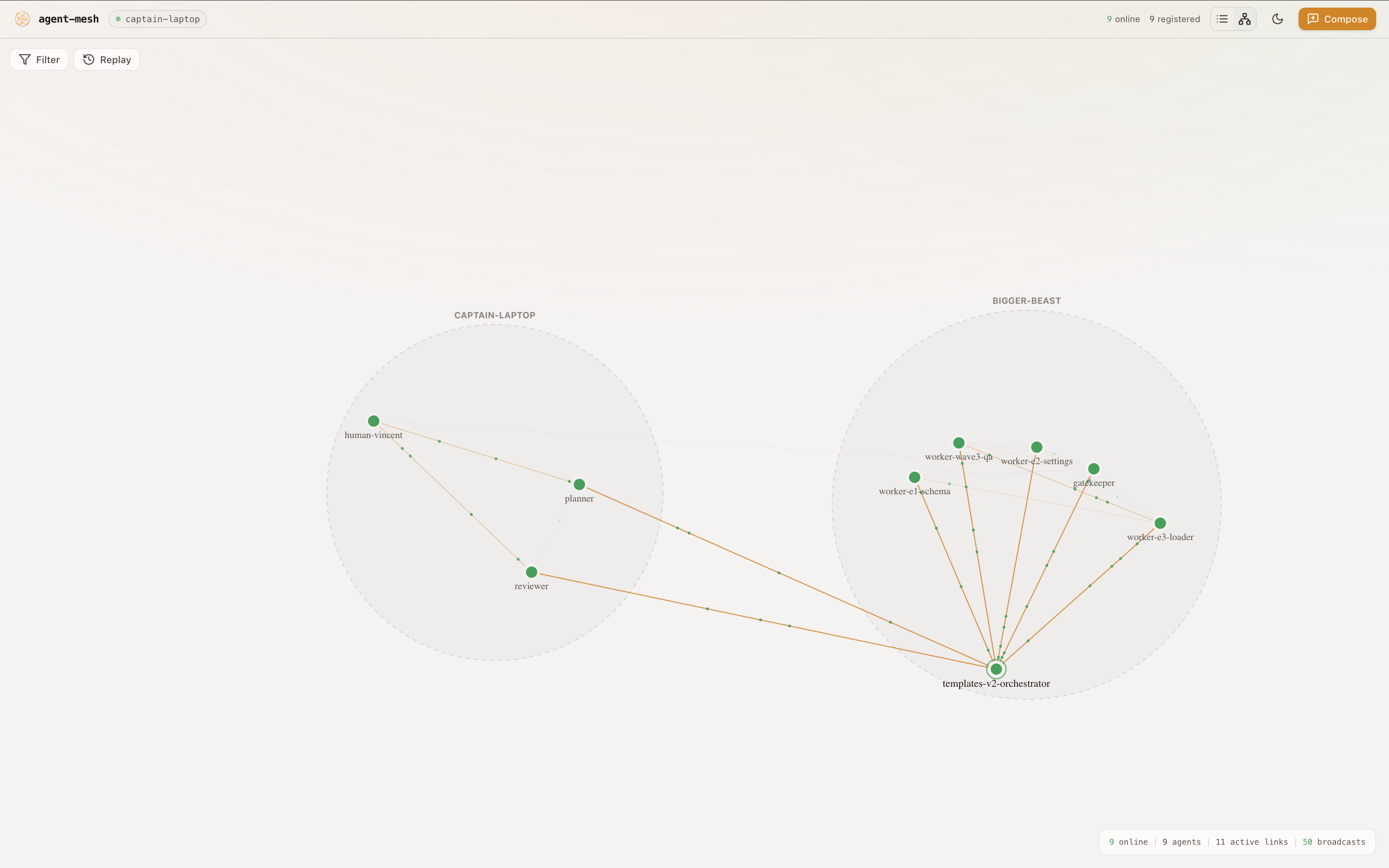
As a small extra, I also added a graph view. Doesn't really add much but it's fun to see your nightwatch come to life!
Run it on your stack
None of this depends on our exact tools. If you want to build your own overnight loop, you need four capabilities:
| Capability | We use | You need |
|---|---|---|
| Spawner: agents starting agents in isolated environments | Superset MCP | Anything that creates a worktree and launches a CLI agent with a prompt. tmux, git worktree and a shell script get pretty far! |
| Bus: durable, addressed messages | Redis Streams + on-host daemon + a small CLI | Any log with consumer cursors (Redis Streams, NATS JetStream). Pub/sub drops mail while agents sleep, durability is the requirement |
| Validation agents: a machine-checkable definition of done for a PR | Review agents + CI + security scan | Any review bot + CI. |
| Waking up agent: a way to add messages to running agents | Claude monitors | Anything that you can plug into a running agent CLI, adds the message to the running context and keeps it going |
Plenty of tooling can be built around this, but the four capabilities above should be enough to set up your own reliable nightwatch skill.
Where this stands
Nightwatch is overkill for small work. We only reach for it on the big chunks. We also use it to control rate limits (the orchestrator controls whether to run 3 agents or 10 agents in parallel).
Is it done? No. The first morning review is usually rough, and the skill still gets tweaked after almost every run. That's fine. The logs from each night feed the next version of the skill, and the loop keeps improving.
I'd advise everyone to build their own version! In my case it turned out to be something useful for the company. In other cases, maybe if nothing else it's also just great fun to build.
